Tuesday, February 1, 2022

Angular 13: Noteworthy Add-ons, Enhancements, and Modifications!


The dynamic team of the popular typescript-based web framework, Angular, has been known for its periodic updates to keep up with changing times and emerging technologies. And, here’s another update that has created a buzz in the technical world. Their latest update, Angular 13, rolled out on 3rd November 2021; is one of their most organized, pre-planned, and game-changing updates so far.

So, what’s new in angular13? Well, this post discusses all the noteworthy add-ons, embellishments, improvements, deletions as well as modifications. Let’s peek through the novel offerings of Angular 13!

Angular 13: Major Add-ons, Enhancements, and Modifications

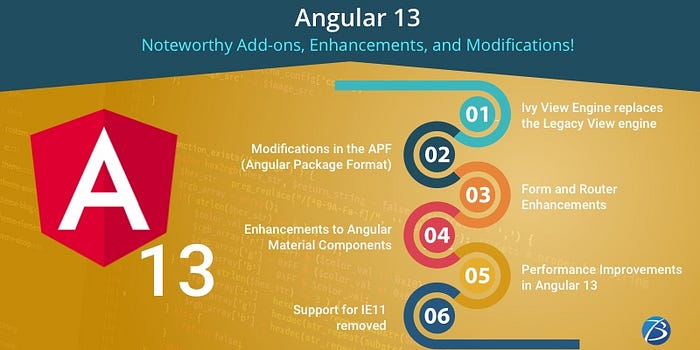
Ivy View Engine replaces the Legacy View engine

After the Angular team had rolled out multiple updated versions that marked a transitioning phase to the Ivy View Engine, Angular 13 is now 100% Ivy. Angular has completely removed support for the legacy view engine and supports only Ivy. The existing libraries will get migrated to the “partial” compilation mode automatically and the metadata that was earlier needed for the legacy View Engine will be removed. Angular developers should switch from “enableIvy:false” to “compilationMode:partial” to keep up with the update.

This update brings about speedier compilation as well as enhanced productivity to Angular app development. Moreover, the Ivy approach enables developers to write codes dynamically unlike the previous versions, wherein the developers needed a boilerplate for code creation. Using the previous versions, developers are required to inject ComponentFactoryResolver into the constructor for creating components. But, with V13, components can be created without having to create an associated factory using ViewContainerRef.createComponent.

Modifications in the APF (Angular Package Format)

The APF (Angular Package Format) defines the format and the structure of the packages contained within the Angular framework. This approach greatly helps in packaging third-party libraries in the web development environment. Angular 13 comes with a new version of the APF, a modernized and streamlined APF.

Modifications and add-ons

· Older output formats including View Engine-specific metadata, have been eliminated which will minimize the maintenance expenses as well as the complexity of the codebase.

· Libraries created using the updated APF will not need to use ngcc any longer; resulting in a leaner package as well as quicker execution.

· The production of UMD bundles have been removed

· The new APF supports Node package Exports and as such, Angular developers will no longer unknowingly rely on internal APIs that are subject to change.

· It generates ES2020 output and Ivy partial compilation output

· The new APF makes use of the package exports using the sub-path pattern feature from Node.js for displaying multiple available outputs at each entry point.

Form and Router Enhancements

V13 comes with FormControlStatus, a new type for forms which is a union type of all status strings possible concerning form controls. This add-on brings about two more modifications — the type of AbstractControlStatus changes to FormControlStatus and StatusChanges now has Observable<FormControlStatus> instead of Observable<any>.

V13 introduces a host of new functions that manage form validation like addValidators, setValidators, hasValidators, removeValidators, alongside their equivalent async versions — addAsyncValidators, setAsyncValidators, hasAsyncValidators, and removeAsyncValidators.

Now let’s take a look at the router modifications. The earlier Angular versions had an empty string to set the routerLink directive value to zero and undefined; without any means for disabling the link’s navigation. However, with Angular 13, you can entirely disable the navigation, if you set the same values to routerLink directive. Another add-on is Active Change, a new output for the RouterLink directive; which is produced every time when a related link becomes either active or inactive. Developers using V13 can use dynamic ESM import statements as in this updated version; the load property that is a part of the route definition is unable to accept string values.

Enhancements to Angular Material Components

The enhancements made to Angular Material Components include:

· The addition of a default role to the “table” and stepper updations

· Improved ARIA descriptions and Datepicker

· Better accessibility of matChipRemove and a sturdy focus option for the slider

· The touch sizes of the radio buttons and checkboxes are now bigger resulting in a smoother UX with higher contrast modes.

· The feature of accurately detecting fake mouse down events from the screen readers employing FocusMonitor such that Angular applications are able to correctly interpret the occurrence of focus or click events on the screen.

Performance Improvements in Angular 13

· The usage of ergonomic code-splitting APIs and the practice of breaking down the granular code at a component level has reduced the load times considerably.

· ESBuild, a superfast JavaScript bundler, has helped in enhancing the performance as well. It works with Terser for optimizing global scripts, supports CSS source maps that allow optimized global CSS, and also supports languages such as Vue, Svelte, and Elm that are used in other frameworks.

· Owing to the new enhanced Angular CLI, the framework currently supports persistent build-cache by default — build outcomes are cached on the disk. Consequently, the speed of Angular app development accelerates by 68% as compared to the existing speed.

· In V13, the opt-in feature is enabled by default

· There are no Angular traits such as Directive, Component, Pipe, NgModule decorators, Injectable, etc. in the incremental builds performance.

Support for IE11 removed

The Angular team has removed support for IE11 (Internet Explorer11) in the latest version Angular13, based on customer feedback, to make it future-ready. As a result, the entire infrastructure concerning IE11 — build passes, CSS code paths, polyfills, special JS, etc. — will be eliminated.

Advantages

· Angular can now enjoy the benefits of native web APIs and also leverage the features of new-age browsers — web animations and CSS variables.

· Angular applications built in Angular 13 will have smaller-sized bundles and load faster as code paths and IE-specific polyfills can be removed.

· It eliminated the requirement for differential loading.

The build infrastructure and enhanced APIs will prove beneficial to Angular app developers, whereas the end-users will enjoy speedier load times as well as an improved UX.

However, this update will affect organizations that still use Internet Explorer 11 and have not yet migrated to modern browsers like Microsoft Edge. For migrating your project to Angular 13, you have to run the ng update — this will automatically drop the IE-specific polyfills and minimize the bundle size during migration. The existing Angular development projects that still need the support for IE11, can continue using Angular 12, which will be supported till November 2022.

Other Noteworthy Add-ons and Enhancements in Angular 13

· The introduction of TypeScript 4.4 allows users to access the multiple languages functionality while working on it. This feature was absent in the previous Typescript versions.

· Now in-built validators like max,min, and minLength can be dynamically enabled or disabled.

· The support for inlining Adobe Fonts has been added in Angular 13, just as inlining Google font support was added during the Angular11 update. Inlining fonts are responsible for speeding up the FCP (First Conceptual Performance) and this improves the web performance substantially.

· Angular Developers can leverage the benefits of the updated RxJS7.4 for developing new projects employing the new ‘ng’ command. The Angular projects that are in RxJS V6.x, are to be manually updated with the help of the command npm install rjs@7.4.

· The TestBed segment is now an improved one that functions impeccably to tear down test modules and environments after every test. The DOM gets cleaned by default after each test. So, developers can expect tests that are lesser memory-intensive, have a lower amount of interdependency, are more optimized, and get executed much faster.

Bottomline:

I hope my post has provided you with comprehensive insights on the most significant updates that influence Angular app development.

Looking for further clarification on Angular 13 updates or would like to hire technical assistance for leveraging these amazing features to build futuristic apps/software solutions?

Contact Biz4Solutions, a highly experienced and distinguished Angular app development company that excel in providing high-end services to clients across the globe.

To know more about our other core technologies, refer to links below:

React App Development

Ionic App Development

Swift App Development

Thursday, January 27, 2022

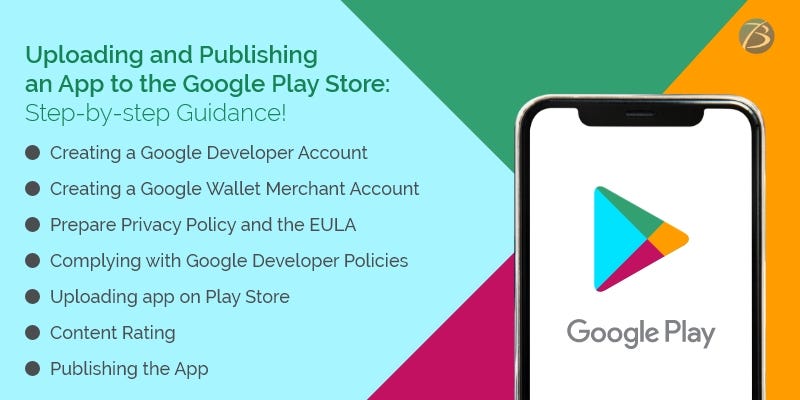
Uploading and Publishing an App to the Google Play Store: Step-by-step Guidance!

You’re finally done with developing an outstanding application and cannot wait to introduce it to the target users! Sounds great! Nevertheless, you are wondering how to execute the subsequent process – uploading and publishing the app on the Google Play Store.

For beginners and novices, this process might seem tricky and confusing. Hence, app creators/owners must be thoroughly aware of the entire process; whether they are doing it themselves or outsourcing the entire project to a mobile app development company.

This post provides step-by-step guidance on how to upload and publish an app to the Google Play Store. So, here we go!

Uploading and Publishing an App to the Google Play Store: Major Steps

Creating a Google Developer Account using Google Play Developer Console

A developer dashboard is a mandatory prerequisite for uploading an Android app to the play store. For this, use the Google Play console – a type of backend controlling center that enables mobile app developers to submit Android apps to the Play Store. A one-time charge amounting to 25$ has to be paid for opening a developer account. No additional charges are levied while updating apps in the future. Furthermore, the same developer account can be used for publishing several Android applications. The developer account comes with loads of functions and control features and allows free uploading of Google Play Store apps. After the developer account request is submitted, it takes up to 48 hours for getting approved.

Check out the steps for creating a developer account:

  • Creating a Google account: A Gmail ID that will be linked to your Google Developer account.
  • Creating a Google developer account in Google Play Console: You need to log in using Google credentials, and then check the box for accepting the agreement concerning your app’s distribution on Google Play. Thereafter, your Google account gets connected with your developer account, and you are provided the option of publishing the app either with a professional account or your personal Gmail account. You have to log in to the Play Store Console with your preferred account and complete the registration process. Once done, click on the option – “continue to payment.”
  • Configuring Google wallet and paying the registration charges: You need to configure Google wallet, by selecting your country from the list available, paying the Play Store charges for developers, providing the personal information asked for, and mentioning the payment details. Now, you need to pay the Play store charges for developers.
  • Setting up the developer profile: Now, set up a developer profile in your developer console. Information like the name, contact number, and email ID of the developer is to be provided and the developer’s name appears on the app profile. Then, click on “complete registration.

Creating a Google Wallet Merchant Account and linking it to the Google Play Developer Account

You need a merchant account for receiving payments from end-users, in case users have to pay for app downloads, or your app supports in-app purchases. Follow the steps given below for creating a merchant account.

  • Sign in using the developer account
  • Click the “Reports” option provided in the menu
  • Choose “Financial Reports”
  • Tap the option – “Set up a merchant account now”
  • Add the details of your business
  • Click on the option “submit”

Now, the merchant account will be linked to the developer account on Google Play Console and you will be able to effectively manage as well as monitor your app’s sales.

Preparing the necessary Documents

It is advisable to prepare the Privacy Policy and the EULA (End User License Agreement) beforehand. For this, you may either refer to the documents of similar applications or hire a lawyer to do the needful.

EULA

EULA, an agreement between the app owner and the end-users, contains some important information including the dos and don’ts to be adhered to while using the product, intellectual property information, and the licensing charges.

Privacy policy

Privacy policy and terms of use mention the services offered by an app and the user behavior expected, though this aspect is not mandatory as per Google standards. A privacy policy includes the information given below:

  • The app’s functional features – free and paid functionalities
  • A list mentioning all kinds of user data that the app collects, processes, and uses
  • The technical information about the users’ device as well as the installed OS that is collected by the app
  • The presence of specific content and age criteria of users (if any)
  • The terms and conditions concerning the subscription
  • Citizenship/location of a majority of the end-users
  • Location of the app’s copyright holder
  • The place of registration of the brand/business enterprise that owns the app
  • The selected legal standards and legislation that will be followed to regulate legal relations or to resolve disputes

Complying with Google Developer Policies

Remember to ensure that your product is aligned with the requirements mentioned in Google Developer Policies. These policies state the prerequisites you need to follow while building, updating, and promoting an app to stick to the high-end standards of the app store. Your app may be blocked, rejected, and even deleted from the Play Store if any of these policies are violated. Your developer account may even be terminated if several repetitive violations are noticed.

Creating the Application and uploading it on the Play Store

Once, the merchant account is registered, the app can be uploaded on the Play Store, by following these simple steps:

  • Select the option called “All Applications” available in the menu
  • Click on the option, “Add a New Application”
  • Now, select the default language from the options provided in the drop-down menu
  • Add the title of your application and it should not exceed thirty characters
  • Tap on the “create” tab
  • You will be directed to the entry page of the store where you have to fill in the complete information regarding your app.

At this juncture you need to choose from two options- Uploading APK or Preparing Store Listing - for continuing the process of uploading the app on Google Play Store.

Uploading APK (Android Package Kit)

An APK refers to an Android-based file format that is used for storing, distributing, and installing applications on Android devices. You can upload the APK by either browsing or navigating or by the process of dragging and dropping the APK into the box. Here are the steps:

  • Select “Release Management” from the menu and then go to “App Releases”
  • Select the type of release you want for your first release from the options – production release, internal test, open test, or closed test. Opt for production release if the app is to be introduced amongst the mass audience and internal test/open test/closed test, if you plan to test the app amongst a certain group of target users before going to production.
  • Click on the “create release” tab and follow the instructions provided for uploading the APK files

Preparing Google Store Listing

The store listing contains one of the most crucial pieces of information regarding app store optimization and provides the user with comprehensive information about your app before downloading. The must-have sections are marked with an asterisk. This process requires some designing as well as copywriting efforts. And, if the job is well done your app is more likely to be displayed in searches by end-users.

  • A product description (up to 4000 symbols) using the necessary keywords and app title (up to 50 symbols)
  • Screenshots (2-8) depicting the best features of the app
  • Icon, promo videos, and tags
  • App type and categorization
  • Languages supported by the app
  • Contact details of support services – phone number, email addresses, website addresses, etc. – if users need to contact you (up to 4000 symbols)
  • Privacy Policy

Content Rating

Content Rating is needed so that your app doesn’t get marked as an unrated application that might lead to its removal from the app store. For this, you need to provide the required information in a rating questionnaire. The information you provide must be accurate, failing which your app might be suspended or your Play Store account might be removed. Once the survey is finished, tap on “Save Questionnaire”, followed by “calculate rating”, and lastly, click on “Apply Rating”. This confirms your rating and now, you are ready to move ahead with the subsequent process.

Fixing the App Pricing and Distribution

As per Google policies, your app will be published in the selected regions/countries only. Moreover, it is important to assign a pricing policy for your application. Tap on the “Pricing and Distribution” option available in the menu and mention the following particulars:

  • Choose whether your app is going to be free or paid. Remember that you are not allowed to convert free apps to paid apps later, but the price can be changed.
  • Choose the countries where your app will be launched
  • Tap on the option “yes” for “Primary Child-Detected”, if your app content suits children below 13 years of age. Otherwise, select the “NO” option.
  • Mention whether you would like to allow ads into your app

Publishing the App

Now comes the final step – publishing the app to the Play Store!

  • Go back to the “App Releases” tab and choose “Manage Production”.
  • Click “Edit Release” followed by “Review”, and then click on the option “Start rollout to Production”.
  • Then click the tab “Confirm” to successfully end the entire procedure – you’ve uploaded your app to the Google Play Store for free.

Wait for your app to get the store’s approval – the store usually takes two hours to a few days to review your app.

Final Words:

I hope my esteemed readers are now well versed with the entire procedure of publishing an app at the app store. However, your journey doesn’t end here! Your app has to compete with more than 2.9 million apps available at the app store for achieving success. Therefore, you need to invest continuous efforts and devise winning marketing strategies for fulfilling your objective.

If you feel that your in-house resources are not enough to meet these requirements, hire professional assistance. In this regard, Biz4Solutions, a leading IT firm offering competent outsourcing software development services, to global clients; would be a reliable technical partner to choose. Let us know your app model and business requirements. We will help you to create a success story.

To know more about our core technologies, refer to links below:
Flutter App development

Java App Development

RoR App Development

Tuesday, January 25, 2022

What are the Factors that affect the Cost of React Native App Development?

The React Native framework is today, one of the most popular picks for architecting cross-platform applications that look, feel and perform like native apps. The key advantages of choosing React Native app development are:

  • Easy learning curve
  • open-source nature
  • Simple UI
  • Faster time-to-market and lesser resources needed
  • Low development cost
  • The availability of pre-built components and ready-made solutions
  • A highly reusable code
  • Effortless switching from web to a mobile-centric app owing to the single-codebase feature
  • Live reloading feature that enables viewing the changes executed in the source code directly on the app without any need to recompile the app
  • A dynamic and vibrant global community

However, business enterprises opting for React Native development must also be aware of the project cost estimate and crucial aspects that elevate the developmental expenses. This article discusses the key factors that accelerate the app development expenses in React Native projects. Check them out!

React Native: In a nutshell

React Native, a JavaScript framework enables the development of natively rendering mobile apps that run across Android as well as iOS. This framework is based on the Facebook JavaScript library of React for creating UIs, but unlike React does not target the browser.

Just like React for the web, React Native applications are created combining JavaScript and XML, an esque markup called JSX. Thereafter, The “bridge” in React Native invokes the native rendering APIs in Java (for Android apps) or Objective-C (for iOS apps). This way a React Native app uses real mobile UI components for rendering instead of using web views leading to native-like mobile app performance. Moreover, this framework exposes JavaScript interfaces for platform APIs, allowing the apps to access platform-centric features such as device camera, the users’ location, etc.

The React Native platform supports Android as well as iOS and holds the potential to expand its capabilities in the coming years. Some of the industry tycoons like Facebook, TaskRabbit, Palantir, are reaping the benefits of this outstanding framework.

Major Factors that Increase React Native App Development Cost

App Complexity matters

Crafting a simple app with an MVP is cost-effective and can be developed much faster. Contrarily, if the app is a complex one with innovative features and integrations, the React Native app development cost as well as the time to execute the project goes up considerably.

The complexity of an app depends on the factors mentioned below:

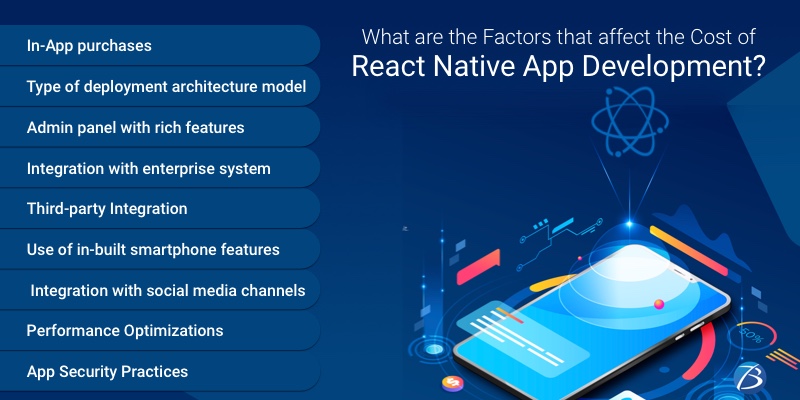
  • The feature of making a purchase within the app as well as the number of in-app purchases.
  • The type of deployment architecture model used for back-end development: BaaS or Custom. The BaaS model involves working around ready-to-use backend architecture while custom development involves delivering a customized structural design as per the specific project requirements of the client. Needless to say, the level of customization increases the complexity.
  • An admin panel with rich functionalities: Using this feature app owners can track down activities taking place within the app, view crucial stats, and update content without seeking help from developers.
  • The kind of legacy integration needed: Integration of the application with an enterprise system or a standalone app. Integrating with business systems requires third-party APIs, extensions, host system app modifications, etc. thereby increasing the app complexity.
  • Third-party integration: This includes third-party plugins that allow an application to interact with other apps’ features, simplify login/payments, and many more outstanding benefits that make an app comprehensible. Nevertheless, the more the number of third-party integrations, the more the complexity.
  • Dependence of an app on hardware like in IoT apps
  • The use of in-built smartphone device features like camera, GPS, Bluetooth, Barometers, Nearby, etc. for enhancing an app’s performance.

Authorization/Login

React Native apps that need any type of authorizations or logins will be costlier to develop as they require role-based checks established by React Native developers. Moreover, the app development team as well as the system development team of an enterprise needs to put in additional efforts to ensure that such apps are created and deployed properly.

UI/UX Design

An app with smooth transitions for moving across screens, well-timed animation, and efficient user flow is highly desirable by end-users. Hence, a well-crafted UI/UX design is necessary for engaging as well as retaining users, but this comes with a price as it increases the complexity of the app.

Additional features

Additional features like integration with social media channels and other lucrative add-ons like in-app purchases; tailored functions, etc. involve extra expenses but make an app all the more captivating, desirable, and client-centric. The inclusion of add-ons depends entirely on the end-user/client preferences and requirements.

Performance Optimization across various Platforms

Sharing codebases across the Android and iOS platforms can adversely affect the app’s performance. And, in order to make a React Native app appear similar across various platforms, app creators have to incur more expenses due to the optimization involved for both the platforms. Apps created in the React Native framework have this inherent quality of utilizing third-party integrations and in-built device features, but obtaining a native-like experience comes with a price.

Experience and Geographical location of the Development Team

Going with a proficient team with rich industry experience will cost you dearly. This is because professional and experienced React Native developers possess a stronghold in their genre and will use their creativity and mastery to make your app all the more unique and innovative. The more expertise, the higher are their charges.

The geographical location of their development team matters too. Teams located in European nations or countries like the US, Canada, and the UK are far more costly than the ones located in South Asian countries.

Hiring react native app development services located in India will however enable you to solve this roadblock as you will get adept, talented, experienced, focussed, and diligent developers at affordable rates.

App Security Practices

Mobile apps involve the collection, storage, and management of administrative as well as client data. And, a data breach can cause severe damage to an app and its reputation. So, app creators must adopt stringent safety measures while app development and maintain strict security practices. Such practices again, accelerate the development expenses to a great extent.

App Maintenance/Support post-Launch

App maintenance post-deployment includes actions like fixing bugs, updating the app with trending features, and design changes needed to enhance the app’s performance. Every app owner needs to invest in managing and maintaining the app post-launch to live up to user expectations and this investment is somewhere around 20-25% of the app creation expenses.

Final Verdict:

React Native app development is preferable over hybrid app development to render native-like apps. And most importantly, it has something to offer to all kinds of app development projects starting from the low-budget ones to highly complex projects.

For any assistance with React Native app development reach out to Biz4Solutions, a highly experienced mobile app Development Company. Our React Native app development services have helped several clients around the globe to fulfil their objectives.

To know more about our core technologies, refer to links below:
 

Ionic App development


Sunday, January 23, 2022

Reasons why Wearable integration is the Future of Mobile Application Development

The Mobile Application Development Saga

Can you guess how many smartphone users are across the world? Well, that’s over 1 billion. You will be surprised to know that a whopping 179 billion mobile applications are downloaded every single year. You can probably fathom that mobile application development is one hot area that’s growing crazily. In addition, with major business entities like Walmart, Amazon, Bank of America, etc. eyeing to engage and sell through mobiles, the mobile application development market is witnessing a massive transformation.

The Rise of Wearables in Mobile Application Development

All scales of companies are rushing to mobile app development companies to transform their business into a popular brand through Digital Transformation services. But that’s not the end. Companies are now interacting with their users through wearable devices. Here’s an interesting find that you would love to know: according to a report from the online marketplace, GlobeNewswire, the global market value of wearables is expected to rise at a CAGR (compound annual growth rate) of 17.2% between 2021-2025; and is predicted to reach 116.88 billion USD by the year 2025. That’s a terrific growth indeed!

The first thing that comes to our mind when someone says a wearable device is an Apple Watch. That’s correct. But do we have any device other than a smartwatch? Yes! For those of you who do not know, there’s Hololens from Microsoft that allows you to interact with virtual content and holograms. Exciting, isn’t it? Well, this is just the beginning.

The scope of wearable devices will definitely surge. Don’t be surprised especially when you see people with smart devices such as watches, clothes, shoes, spectacles, headgears, etc. You will be amazed to know that these gadgets will communicate with mobile apps to pass information seamlessly.

Future of Mobile Application Development

This revolution in mobile technology will change the dynamics of mobile application development services. Rather, not forget that IoT (Internet of Things) will empower these devices to act as remote controls to other devices and gadgets. Why are people embracing wearable apps/devices? The most important reason is that it’s helping people to tackle routine challenges related to various areas of fitness, education, media, healthcare, etc.

The dynamics of mobile app development are changing with wearable devices hitting the market. The most prominent changes that mobile app development would see are:

Ergonomic: The interface developed for the devices should have ‘just right’ information to be displayed to the user. Probably, this also includes the way these wearable devices would receive notifications – very concise.

Change in Screen Size: Screen Size changes mean a more user-friendly interface. That seems like a key area, mobile app developers should watch out for.

More Responsive: To make it more interactive to commands, the mobile application development company will work towards making apps more responsive. Users wouldn’t want to use slow apps because in that case, they would rather prefer to use traditional smartphones, isn’t it? Well, this also means apps will be developed with better computing ability.

Doesn’t require much power: As a user, you would always want a device that works the longest period without having to recharge, isn’t it? So, mobile applications have to be built keeping this fact very much in mind.

Highly Interactive: Wearable applications that respond to a voice command or hand gestures would become game-changers especially in the mobile app development arena. Hence, the above-mentioned points are a few of the areas where a major chunk of change will happen in mobile application development. Furthermore, there is no denying that there will be other relevant areas too. Technologies such as artificial intelligence, cloud technology, augmented reality, and IoT (Internet of Things) will have a major role to play and as a result, they will change the mobile app development landscape altogether.

Conclusion

Since you have spent your precious time reading this article so if you are keen to know more about mobile app development for wearables or even planning to hire an experienced wearable app development company for building a smart mobile app, reach out to Biz4Solutions. We are a distinguished mobile application development company having 10+ years of experience in crafting highly functional and competent software solutions. We will assist you by helping you integrate IoT for elevating your business to a new level. And there’s a lot more we can help you with within this arena. Choose our mobile app development services today for more!

To know more about our core technologies, refer to links below:
Sencha Ext JS App Development

Swift App Development

Nod.Js App Development

Tuesday, January 18, 2022

Top React Native Libraries to watch out for in 2022: Overview and Offerings!


The React Native framework offers a wide range of tools and libraries that ease out the task of software developers and speed up the development process. These libraries contain innovative components that can be integrated into web/mobile apps to create amazing interfaces. Thanks to these ready-to-use libraries, React Native developers no longer need to create the code from scratch — they can adjust these readymade elements as per the requirements of their software development project.

One can find numerous useful React Native libraries on GitHub that are easily accessible. However, the availability of myriad options often confuses app development teams trying to pick the best-suited library, and so, it is important to be well versed with these libraries. This post provides glimpses of the top libraries you need to consider in 2022 as well as handy insights on their offerings and USPs. Check them out!

Top React Native Libraries of 2022

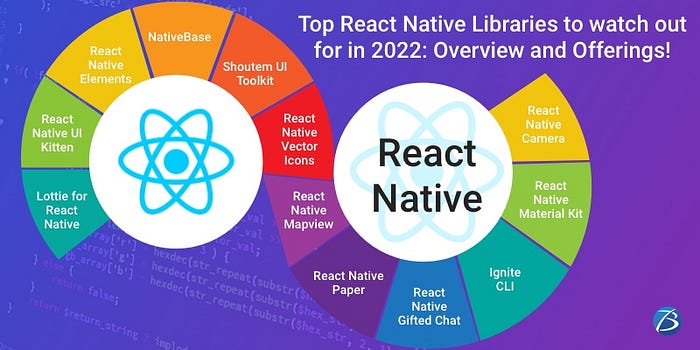
Lottie for React Native

This library facilitates adding animations in React Native apps across several platforms — Android, iOS, Windows, and the Web. The Lottie component parses Adobe After Effects Animations that are exported in the JSON format, using Bodymovin and then, renders these animations on the mobile and the web. This way, the designers can build animations and ship them, without the need for engineers to take the effort of recreating animations by hand.

This React Native app development library is portable, offers a magnanimous collection of in-app animations, and can be accessed by the developers around the globe via open-source licensing. Using these animations you’ll be able to craft a captivating UI for your React Native applications. And, since the animation files are small-sized and come in vector format, the app’s performance is not impacted either.

React Native UI Kitten

This React Native UI library facilitates the development of alluring multi-brand mobile apps with cross-platform compatibility. React Native UI Kitten is based on Eva Design System and therefore, the designing as well as the app building process becomes consistent and scalable. It offers generic UI components and its themes can be altered during the run time, without having to reload the app.

React Native Elements

This library allows app developers to integrate various open-source UI modules in a single place and utilize pre-built app development packages comprising several modules such as search bar, divider, etc. It provides the developers complete control over the app design and empowers them to model the app components as per the requirements. React Native Elements will save the time and efforts of your development team as there is no need for rewriting the same code. This leads to the development of a distinct app within a shorter time span.

NativeBase

React Native Base facilitates the creation of visually captivating applications that are easy to use. It contains a rich collection of React Native components with cross-platform compatibility, theme templates, and handy tools like starter component kits with keyboards, buttons, text fields, etc. This library enjoys ample customizable attributes and can be even updated with additional features. As such, developers can create an agreeable interface effortlessly as well as speedily.

Shoutem UI Toolkit

This is an open-source UI toolkit for architecting React Native apps. It offers UI components with a predefined style, transition animations, various well-coded and highly customizable app themes, parallax effects, a giant extension library, and a plethora of back-end services including push notifications, user authentication, analytics, layouts, etc. Using Shoutem, app creators are able to design outstanding solutions with a professional look and feel.

Shoutem functions by employing modular building blocks or extensions like galleries for videos/photos, events, products, restaurant menus, etc. It works in the same manner as a website created using plugins on WordPress.

React Native Vector Icons

React Native Vector Icons offers over 3,000 icons that can be styled, extended as well as customized as per your project needs. This library supports Toolbar Android, TabBar, image source, and multi-styled font. It’s an apt choice for creating logos, buttons, and navbars. The package utilizes the animated library of React Native and integrates it with an icon for building an animated component. If an icon font having an associated CSS file already exists, an icon set can be effortlessly generated with the help of a generate-icon script.

React Native Mapview

This library allows integrating map modules into React Native mobile apps. It provides various methodologies of customizing the map style, allows changing the position of the mapview, and enables the creation of animations when zooming into the required location.

Using React Native Mapview, map features are controlled using an API — react Native API or Geolocation is used for determining the users’ global position. The Geolocation API is contained within a global navigator object via navigator.geolocation. The navigator.geolocation offers handy functions like discovering the user’s current location at any given point of time, watching over the position, and many more.

React Native Paper

This is an open-source element library that comes with components having material design standards. This cross-platform library provides theming support. It offers light, as well as dark themes, and users can seamlessly switch between these two themes. The Appearance API of React Native is used for implementing theme switching as per the device’s settings while customizing the theme.

React Native Gifted Chat

This library helps in creating the chat UI in React Native apps. React Native Gifted Chat comprises fully-customizable components written with Typescript and enables an array of actions including copying messages to the clipboard and stacking of previous messages. Moreover, it offers numerous features to speed up the process of messaging and make it more effective altogether. Furthermore, this library offers easy-going composer actions having multi-line input that enables users to attach media.

Ignite CLI

This is a free starter kit employed for React Native applications. It comes with a React Native boilerplate that assists in the app development process. This library is easy to install, has been created as per the best practices, and most importantly, the boilerplates can be effortlessly adapted to React Native projects. Its support for standalone projects and ability to function with iOS as well as Android is commendable. Besides, development teams can select a boilerplate from various options or create one of their own as well. The addition or creation of app features is possible on account of the modular plugin system.

It also offers a usage example screen that enables the testing of third-party libraries, developing apps with several components, and provides examples of common apps created using basic components. No wonder, Ignite CLI has attained more than 10,000 GitHub stars.

React Native Material Kit

This React Native UI library serves as a complete solution for the user interface and is maintained in a better way as compared to other UI tools available for the React Native framework. It offers material design-based components and even dynamic components that are available for selected frameworks only.

React Native Material Kit comes with cards; buttons; text fields; range sliders; spinners and progress bars that display the loading process; toggles for switches, checkboxes, and radio buttons; and an advanced API for creating custom components.

React Native Camera

React Native Camera turns out to be an immensely useful component when the camera feature needs to be implemented within apps built in React Native. This component supports videos, photographs, text recognition, barcode scanning, and face detection; and enables react native developers to effortlessly communicate with the device’s camera using a few easy functions, without needing to think about the native code.

Concluding Lines:

The aforesaid React Native Libraries are undoubtedly game-changers in the realm of React Native application development. If you require professional help in crafting React Native apps, reach out to Biz4Solutions, a proficient React native development company offering top-notch services to global clients across diverse industry verticals.

To know more about our other core technologies, refer to links below:
Ionic App Development

.Net App Development

Angular App Development

Statistics defining Spotify’s unprecedented Success and the Future prediction of the Media Streaming Industry!

Online media streaming platforms had started to gain recognition amongst users in the past decade. This trend was further intensified ever since the rise of the stay-at-home economy induced by the Covid19 pandemic. And, this trend is here to stay! In this post, we will discuss some important facts and stats revolving around Spotify, one of the most trending platforms of modern times that indicate the bright future of media streaming apps.

Spotify is the popular international music streaming platform that enables one to listen to, access as well as download millions of songs on all kinds of devices. Its prime objective is to provide universally accessible content and prevent individuals from downloading music illegally. Let’s peek through the unique offerings, success stories, and interesting facts about the journey of the Spotify app! A quick read will be immensely beneficial to entrepreneurs planning to invest in on-demand media streaming app development.

Spotify: Offerings

Spotify is a Sweden-based provider offering media/audio streaming services. It boasts of having more than 381 million active users per month. The users of this leading music streaming platform enjoy instant access to its humongous library comprising of podcasts and music; and can listen to any piece of music as per their liking, at any time. What’s more?

  • The podcasts and music offered by Spotify are digital copyright restricted.
  • The service is available on most modern-era devices – Android and iOS smartphones/tablets, macOS/Linux computers, Windows, digital media players like Roku, and AI-empowered smart speakers like Google Home, Amazon Echo, etc.
  • Users can search for music as per their preferred artist, album, genre and are able to create, edit, as well as share playlists.
  • Users have the flexibility to pick from over seventy million songs from diverse musical genres including classical, pop, obscure indie rock, and movie soundtracks; rendered by a huge variety of artists.
  • There’s a complex algorithm that provides music recommendations based on the listening history of users, access to internet radio stations, and curated playlists.
  • A wide range of podcast content is available and so it is equally appealing for users who love listening to technical discussions, real crime stories, etc.
  • Users can find friends and follow artists or friends using the in-app “find friend” option.
  • Lately, Spotify has introduced the unique feature “Cosmic Playlists” –users can enjoy the theme and tone of music based on their astrological signs.

Spotify: Business Models

Spotify offers an ad-included free version as well as a premium version.

Free Version

The freemium service comes with basic features and limited user control. Free users can access the content by signing up through an email ID or simply by connecting with Facebook. In this case, the Spotify app’s monetization strategies include audio advertising, the selling of video, display, playing ads while media streaming, etc.

Premium Model

The paid version is quite reasonable and offers extra features like top-quality tracks, offline listening, ad-free streaming, and many more. The Premium plan is further categorized into three different plans based on the needs of diverse groups of the target audience.

  • Standard Plan: Users can access the whole catalog of podcasts, songs, as well as audiobooks, even from an overseas location.
  • Student Plan: This subscription model is available for students who have enrolled in some college or university and is cheaper as compared to the standard premium subscription, despite providing the same set of features. The subscription lasts for a whole year at one go, with a four-year limit altogether.
  • Family Plan: This plan offers access to up to six individuals who reside together. Users can also exercise parental control over inappropriate pieces of music for any specific family member.

Spotify’s eventful Journey

The concept of Spotify was coined by Martin Lorentzon and Daniel Ek in 2006.  Back then, Spotify was available across 6 European countries, and by 2011, it had reached the American market.

In February 2009, it opened public registration in the UK, for its free service tier. With the launch of Spotify’s mobile service, registrations sky-rocketed and this led to a temporary hold on its free service – an invitation-only policy was adopted.

While its US launch in 2011, the policy changed. A free trial was offered to users for six months and during this period users were entitled to listen to ad-included unlimited streaming. After the expiry of this free trial period, users were limited to listening to ten hours of streaming per month and five replays for each song. These limitations applicable for the free version were later dropped.

One of the most significant USPs of Spotify: AI and ML integration

The integration of avant-garde technologies like machine learning and artificial intelligence is one of the most significant USPs of Spotify. This is because the collected data greatly influences Spotify’s decision-making process. The gathered information navigates algorithms and plays a crucial role in improving the UX.

For this reason, Spotify is able to recommend user tracks that users may not have heard before, but those tracks are based on the songs they have listened to earlier and are most likely to be interested in. Furthermore, ML improves user recommendations with time resulting in user retention and loyalty.

Interesting Stats defining Spotify’s Success Story

  • 50% of the Spotify app users were premium subscribers in 2021- Spotify has 365 million users per month in 2021; and out of them, 165 million users were signed up for the paid version.
  • Spotify’s market share as in 2021 was 32% of the online music streaming market which is quite ahead of Apple music’s share (25% of the market share)
  • Spotify has launched a new version Spotify Lite app that requires only 10 MB of space for installation. Spotify Lite has made its mark in 37 countries across the globe, including India, and boasts of more than 10 million users.
  • 55% of users have used their Facebook accounts to register for Spotify. This indicates that modern users prefer the hassle-free option of social media integration rather than creating a distinct account.
  • 7% OF Spotify users hail from the US
  • 29%/one-fourth of the users are millennials – individuals across all categories enjoy Spotify’s music streaming service.
  • Despite the streaming service being available on a wide range of platforms, 52% of the audience use their smartphones for accessing Spotify while 10% of the users use their tablets.
  • Users tune in to Spotify for 148 minutes daily on an average.
  • Users listen to 41 different artists per week and this indicates that the entertainment platform serves as a high discoverable option for artists and also enables them to a wider range of audience effortlessly.
  • Spotify offers a unique feature – allows users to upload media tracks from their personal devices. As a result, it has been observed that 60,000+ songs are added daily on this platform.
  • The Spotify playlists are categorized into three parts – personalized, UGC, and curated playlists. And, 17% of the playlists accessed by users are personalized.
  • Spotify has generated a revenue of over 2.5 billion euros. This figure is much more as compared to the revenue generated during the corresponding quarter of the previous fiscal period that was 0.6 billion.

The Future of Media Streaming Apps

Today, popular media streaming apps have come a long way to deliver a blended approach comprising entertainment as well as wisdom and creativity that is highly intriguing and appealing to the audience.

Industry veterans have predicted that with the advent of high-speed internet via the 5G technology, media consumption is going to rise. Moreover, media streaming platforms will become more affordable in the coming days leading to more consumers.

Therefore, the media streaming apps and platforms have to keep their services updated to match the newest trends and fulfill the needs of modern-day consumers, specifically their desire for customized content.

Final Verdict:

The facts and stats about the Spotify app clearly indicate the developmental requirement of tailoring on-demand apps like Spotify. If you are looking for experienced on-demand app development services, contact Biz4Solutions, a leading firm offering high-end offshore software development services to the global clientele.

To know more about our core technologies, refer to links below:

Flutter App development

PHP App Development

Node.JS App Development