Showing posts with label React Native app development. Show all posts

Thursday, February 24, 2022

Best 5 Backend Services for React Native Applications

React native has emerged as a very promising and effective platform for mobile application development. With many successful companies such as Uber and Facebook adopting it, the language has become very popular for application development. This new age of the Internet has made mobile application imperative for every business for which React Native is the perfect answer.

What is React Native?

React Native is a Java Script built on React, used to develop mobile applications for iOS as well as Android platforms. With React Native, one code can be used for cross-platform development. It also allows the developer to use the native features of the mobile. This means that the applications built on React Native can use the features such as a camera that is present on the phone. 

What is BaaS (Backend as a Service)?

Backend-as-a-service acts as the middleware that empowers the developer with cloud-based backend services allowing them to develop the front end. It is a cloud service model where the developers are facilitated with prewritten software that supports and activates different server-side capabilities including database management, user authentication, cloud storage, remote updating and push notifications via Software Developer's Kit (SDK) and Application Programming Interface (API).

Benefits of BaaS

Backend as a Service offers multiple benefits.

Higher accessibility: BaaS facilitates a higher level of accessibility in many technical aspects including data sharing and cloud storage. Better accessibility leads to higher scalability, fast response, and better customer experience.

Faster development: A BaaS service can be used for all the underlying needs in application development, saving the developer’s time in recreating different stacks for every mobile application.

Better customizations: Backend allows the same basic level of codes to be implemented with different APIs to create different customizations. BaaS benefits the user with multiple customizations which can be used to cater to a larger customer base.

Greater ease of use: BaaS service providers are responsible for the maintenance and hosting of their solution. This reduces the burden on developers and provides greater ease of use.

Best Backend services for React Native
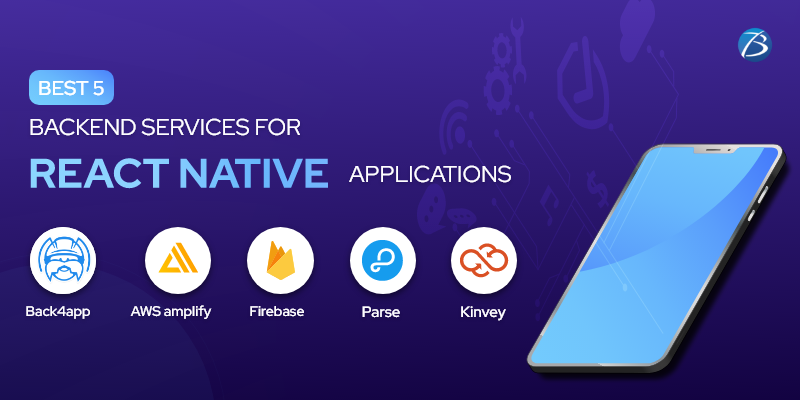
Creating a complex solution requires the right tech stack that is provided by the BAAS services to make the applications scalable and highly functional.  Let’s have a look at some of the best backend services in the market.

  1. Back4app

Back4app is a fully managed solution that provides great flexibility in terms of scalability, optimization, and customizations. It supports a wide range of technology stacks including MongoDB, React, Node JS, and Parse. Development of everyday activities such as push notifications becomes easier for the developers with the codes provided by the backend. 

  1. AWS amplify

AWS amplify is an Amazon-backed solution that facilitates speed and scalability. The developers get access to Amplify libraries and guided workflows which can be used to create a powerful cross-platform backend. The maintenance of this BaaS Service gets easier with Amplify hosting which allows you to host the applications globally via their Content Delivery Network (CDN). The AWS Amplify console provides the ease of managing the user and content.

  1. Firebase

Firebases backed by Google which adds to its relevance. Integration with Google Analytics is a major advantage for developers where they get to know the consumer response to the application in real-time. Firebase Analytics is used to increase customer engagement and retention rate. This backend service comes with a storage to make the solution scalable and secure. It has many features to fasten the development process. 

  1. Parse

Parse is one of the popular choices as a backend. It is an open-source platform where the SDKs and the libraries can be easily downloaded. The backend service come with a large community forum to assist the new developers in using the code. It provides object and file storage for faster development.

  1. Kinvey

Kinvey is serverless application development platform that provides backend and frontend SDKs to develop applications. The developers get access to the abstraction layer where different abstractions are available for different kinds of implementations. Kinvey focuses on the logical development of an application for better user experience and customer satisfaction. It also offers other features such as storage and integration.

Backend Selection

With multiple backend services available, any company needs to be very decisive in selecting any one of them. Parse can be a great backend for small projects where the user can use all the codes for free. The learning gets only better with the community support.

For the React Native applications demanding a higher level of customizations and features, Back4App, AWS Amplify, Firebase, and Kinvey are great options. The selection should be based on the pricing and model of use.

Conclusion

Backend is important for storing and organizing data to smoothly run the real-time functionalities of any application. It is important to integrate a backend to amplify the performance and security of the application. Biz4Solutions is one of the leading React Native app development companies. We offer cross-platform app solutions using cutting-edge react-native technologies. Our experienced React Native developers will help you map your requirements and develop a solution that enhances customer satisfaction. Contact us today to develop the best react native app to thrive in the competitive environment.

To know more about our other core technologies, refer to links below

Ionic App Development

Angular App Development

.Net App Development

Tuesday, January 25, 2022

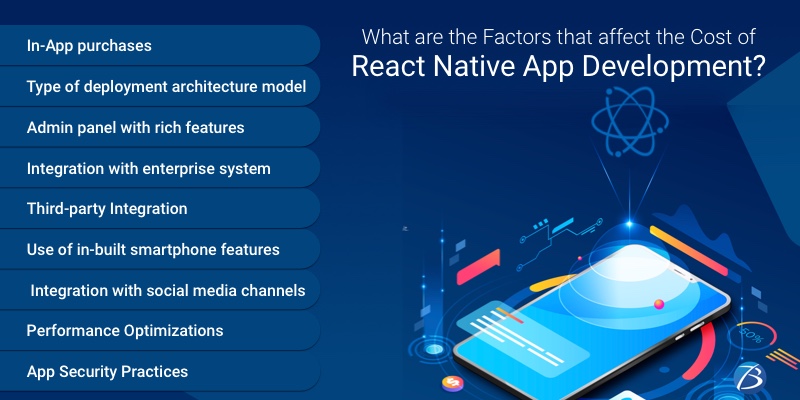
What are the Factors that affect the Cost of React Native App Development?

The React Native framework is today, one of the most popular picks for architecting cross-platform applications that look, feel and perform like native apps. The key advantages of choosing React Native app development are:

  • Easy learning curve
  • open-source nature
  • Simple UI
  • Faster time-to-market and lesser resources needed
  • Low development cost
  • The availability of pre-built components and ready-made solutions
  • A highly reusable code
  • Effortless switching from web to a mobile-centric app owing to the single-codebase feature
  • Live reloading feature that enables viewing the changes executed in the source code directly on the app without any need to recompile the app
  • A dynamic and vibrant global community

However, business enterprises opting for React Native development must also be aware of the project cost estimate and crucial aspects that elevate the developmental expenses. This article discusses the key factors that accelerate the app development expenses in React Native projects. Check them out!

React Native: In a nutshell

React Native, a JavaScript framework enables the development of natively rendering mobile apps that run across Android as well as iOS. This framework is based on the Facebook JavaScript library of React for creating UIs, but unlike React does not target the browser.

Just like React for the web, React Native applications are created combining JavaScript and XML, an esque markup called JSX. Thereafter, The “bridge” in React Native invokes the native rendering APIs in Java (for Android apps) or Objective-C (for iOS apps). This way a React Native app uses real mobile UI components for rendering instead of using web views leading to native-like mobile app performance. Moreover, this framework exposes JavaScript interfaces for platform APIs, allowing the apps to access platform-centric features such as device camera, the users’ location, etc.

The React Native platform supports Android as well as iOS and holds the potential to expand its capabilities in the coming years. Some of the industry tycoons like Facebook, TaskRabbit, Palantir, are reaping the benefits of this outstanding framework.

Major Factors that Increase React Native App Development Cost

App Complexity matters

Crafting a simple app with an MVP is cost-effective and can be developed much faster. Contrarily, if the app is a complex one with innovative features and integrations, the React Native app development cost as well as the time to execute the project goes up considerably.

The complexity of an app depends on the factors mentioned below:

  • The feature of making a purchase within the app as well as the number of in-app purchases.
  • The type of deployment architecture model used for back-end development: BaaS or Custom. The BaaS model involves working around ready-to-use backend architecture while custom development involves delivering a customized structural design as per the specific project requirements of the client. Needless to say, the level of customization increases the complexity.
  • An admin panel with rich functionalities: Using this feature app owners can track down activities taking place within the app, view crucial stats, and update content without seeking help from developers.
  • The kind of legacy integration needed: Integration of the application with an enterprise system or a standalone app. Integrating with business systems requires third-party APIs, extensions, host system app modifications, etc. thereby increasing the app complexity.
  • Third-party integration: This includes third-party plugins that allow an application to interact with other apps’ features, simplify login/payments, and many more outstanding benefits that make an app comprehensible. Nevertheless, the more the number of third-party integrations, the more the complexity.
  • Dependence of an app on hardware like in IoT apps
  • The use of in-built smartphone device features like camera, GPS, Bluetooth, Barometers, Nearby, etc. for enhancing an app’s performance.

Authorization/Login

React Native apps that need any type of authorizations or logins will be costlier to develop as they require role-based checks established by React Native developers. Moreover, the app development team as well as the system development team of an enterprise needs to put in additional efforts to ensure that such apps are created and deployed properly.

UI/UX Design

An app with smooth transitions for moving across screens, well-timed animation, and efficient user flow is highly desirable by end-users. Hence, a well-crafted UI/UX design is necessary for engaging as well as retaining users, but this comes with a price as it increases the complexity of the app.

Additional features

Additional features like integration with social media channels and other lucrative add-ons like in-app purchases; tailored functions, etc. involve extra expenses but make an app all the more captivating, desirable, and client-centric. The inclusion of add-ons depends entirely on the end-user/client preferences and requirements.

Performance Optimization across various Platforms

Sharing codebases across the Android and iOS platforms can adversely affect the app’s performance. And, in order to make a React Native app appear similar across various platforms, app creators have to incur more expenses due to the optimization involved for both the platforms. Apps created in the React Native framework have this inherent quality of utilizing third-party integrations and in-built device features, but obtaining a native-like experience comes with a price.

Experience and Geographical location of the Development Team

Going with a proficient team with rich industry experience will cost you dearly. This is because professional and experienced React Native developers possess a stronghold in their genre and will use their creativity and mastery to make your app all the more unique and innovative. The more expertise, the higher are their charges.

The geographical location of their development team matters too. Teams located in European nations or countries like the US, Canada, and the UK are far more costly than the ones located in South Asian countries.

Hiring react native app development services located in India will however enable you to solve this roadblock as you will get adept, talented, experienced, focussed, and diligent developers at affordable rates.

App Security Practices

Mobile apps involve the collection, storage, and management of administrative as well as client data. And, a data breach can cause severe damage to an app and its reputation. So, app creators must adopt stringent safety measures while app development and maintain strict security practices. Such practices again, accelerate the development expenses to a great extent.

App Maintenance/Support post-Launch

App maintenance post-deployment includes actions like fixing bugs, updating the app with trending features, and design changes needed to enhance the app’s performance. Every app owner needs to invest in managing and maintaining the app post-launch to live up to user expectations and this investment is somewhere around 20-25% of the app creation expenses.

Final Verdict:

React Native app development is preferable over hybrid app development to render native-like apps. And most importantly, it has something to offer to all kinds of app development projects starting from the low-budget ones to highly complex projects.

For any assistance with React Native app development reach out to Biz4Solutions, a highly experienced mobile app Development Company. Our React Native app development services have helped several clients around the globe to fulfil their objectives.

To know more about our core technologies, refer to links below:


Ionic App development


Monday, December 27, 2021

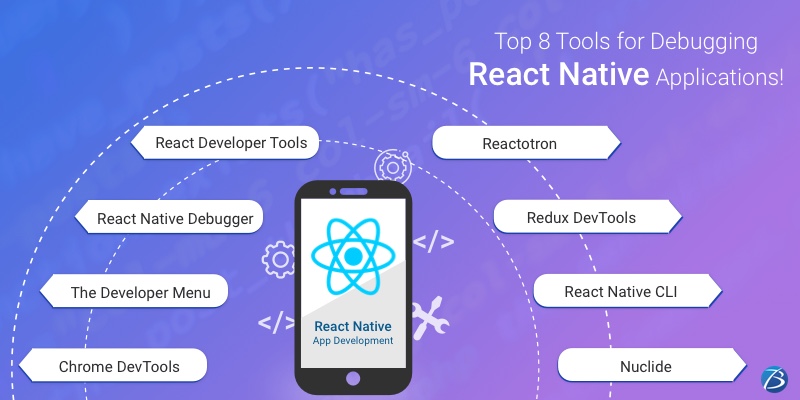
Top 8 Tools for Debugging React Native Applications!

Debugging an application is the most essential part of the complete React Native development process before the application is pushed to the production phase. This is true for other technologies as well. Debugging involves thorough checking of the code and helps in the early detection of error conditions. Fixing these errors or bugs during the React Native app development process, instead of fixing them in the production stages can be highly economical for every company offering React Native app development services.

So, how does the debugging take place in React Native? Well, thanks to the availability of a wide range of React Native debugging tools that help the developers debug their code efficiently in a short time.

This post is a brief guide for you, where we will be exploring the most popular debugging tools used for React Native applications globally. So let’s quickly get started.

Most Efficient Debugging Tools for React Native Developers

React Chrome Developer Tools

‘Chrome DevTools’ is usually the first name that comes to the mind of a React Native developer for debugging the code of an app. Being powered by JavaScript, this tool enables the debugging of both web appsas well as mobile apps. The React Native framework supports this tool through its remote debugging abilities by default.

So how does this tool work?

When your React Native app is running on an Android Emulator and you have to access the in-app developer menu, press ‘Cmd+M’ on Mac or ‘Ctrl+M’ on Windows. When the app runs on a real device, simply shake the device. Now, a menu will appear and you need to click on “Debug JS Remotely” to open the Google Chrome debugger. Thereafter, press ‘Command+Option+I’ on Mac or ‘Ctrl+Shift+I’ on Windows to open Developer Tools. You can now use console statements and debug the app. You may view your code by clicking on the Developer Tools Sources tab and open-sourcing the files. From here, you can add breakpoints and easily debug the app using the ‘Chrome DevTools’.

The Developer Menu

The developer menu comes with a plethora of options for the developers to carry out various functions, as given below:

  • Reloading option for reloading the app
  • Enabling Hot Reloading for watching the changes accumulated in a changed file
  • Debugging js remotely for opening a channel to a JS Debugger
  • Enabling Live Reloading for allowing the app to automatically reload when the save button is clicked
  • Toggle Inspector for toggling an inspector interface. It enables the developers to inspect a UI element present on the screen along with its properties. This interface has some other tabs too, which include a tab for performance and for networking that show us the HTTP calls

React Native Debugger

This React Native tool is a stand-alone desktop application that works on Linux, Mac, and Windows and is one of the most recommended debugging tools. It can be integrated with the other two tools- React’s Developer Tools and Redux DevTools, thus giving you the best of both tools. This combination doesn’t require any setup and can be installed quickly with ease. With this combination, react native developers can get some of the best features as below:

  • Profiler: Identify performance issues by getting a flamegraph with components
  • Elements: for examining the styles of the elements, editing them, and instantly viewing the results in the simulator
  • Console: for examining different errors and warning messages
  • Network: for checking and recording network requests
  • Sources: for debugging JS, setting breakpoints, and walking through the code.
  • Memory: for detecting any memory leaks

React Developer Tools

This tool is considered one of the best tools for debugging React Native due to the following reasons.

  • This tool allows the debugging of React components.
  • Its new version allows debugging styles in React Native and also works simultaneously in the developer menu with the inspector. In this version, the developers can debug and employ the style properties and without even reloading the app can instantly view the modifications implemented in the app.

So how do you get started with this tool?

You need to use the desktop app for debugging React Native with this tool. It can be installed locally as well as globally in the project by using the below command- “yarn add react-devtools” or npm- “npm install react-devtools –save”

Now you can start the application by running the command- “yarn react-devtools” which will launch your application.

Reactotron

This open-source desktop app was designed in 2016 by Infinite Red. This tool enables the inspecting of the apps quite effortlessly. It is available for various operating systems like Linux, Mac, and Windows. It offers amazing features like:

  • state tab
  • React Native tab
  • timeline tab for tracking app events and Redux actions
  • connections for running several devices simultaneously and quickly switching debugging

Redux DevTools

Redux DevTools is also a standalone tool and a state container for JS applications. It is meant for both- React Native and React JS. It is used for common state management and allows easy inspection between actions and their reflections on the data store. Redux DevTools allows using redux debug components directly into the applications. This tool comes with several useful features such as Chart, Slider, Inspector showing real-time actions, Dispatcher, State tab, Action tab, Diff tab, Log Monitor, Test tab, Export/import, etc. You can start using this tool by installing the Redux Devtools Extension to the firefox or chrome browser.

React Native CLI

This React native tool is majorly used for developing React Native apps and is also used as a debugging tool at times. React Native CLI helps to access some relevant information about the dependencies and libraries used in the app. This information can be then used for debugging some bugs that take place due to a mismatch of different versions of tools being used for your app development.

Nuclide

Nuclide is an open-source tool and enjoys the support of a strong community. It can be added as a plug-in on top of Atom- a renowned IDE built by Facebook. It offers some outstanding features like auto-complete, jump-to-definition, inline errors, etc. Also, it provides services like Hack development, Remote, and JavaScript development, working sets, built-in debugging, task runner, mercurial support, etc.

So, our blog comes to an end with this.

Final Verdict:

Apart from the tools mentioned above, there are several other React Native debugging tools like Flow, Expo, Ignite, Visual Studio Code, etc. that can be considered by the React Native development services for their projects. It depends on what tool seems right for your project requirement, what your budget and time considerations are, and what your developers are convenient with. You may even go with a combination of some of these tools. And last but not the least, hiring skilled and experienced React Native developers or React native app development company also impacts the debugging process.

We hope this read was insightful!

Do share your knowledge and experiences about other React Native Developer Tools in the comments section.

Here is a detailed list of the top-notch React Native developer tools widely used for serving various purposes like development, debugging, testing, etc. in the React Native development process.

Also, here are some of the UI component libraries used in React Native for building world-class apps.

To know more about our core technologies, refer to links below:

Ionic App Development

.Net App Development

Angular App Development


Thursday, December 16, 2021

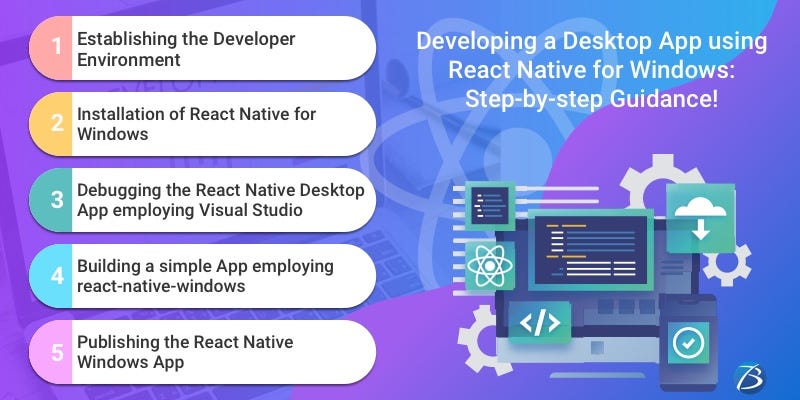
Developing a Desktop App using React Native for Windows: Step-by-step Guidance!

Would you like to architect a premium quality Windows Desktop Application?  Well then, employing React Native for desktop/Windows is one of the most preferred solutions for desktop application development. The reasons are manifold.

Facebook devised React, a free and open-sourced library known for crafting dynamic user interfaces. Later on, the Facebook team coined React Native. Using the React Native framework, developers were able to build cross-platform native mobile applications with React as the core interface. Furthermore, they were able to develop native mobile apps for iOS/Android, employing a single codebase based on React syntax.

This blog provides useful insights on React Native for Windows, its usage in a project, and guides you through the key technical steps involved in building a React native desktop app. So, let’s get the ball rolling!

React Native for Windows: Overview

React Native Windows was devised by the Microsoft team a couple of years back and is actively created to date with an objective to keep its releases parallel to the React Native releases rolled out by Facebook.

React Native Windows allows using the React Native framework on desktop. It resembles React Native in terms of architecture, tools, languages used, eco-system, and developer experiences. Therefore, React Native app developers can easily comprehend and work with React Native for Windows. The only aspect that developers should watch out for is that React Native Windows is rooted in Windows technologies and hence, in such projects, the Universal Windows Platform (UWP) will be invoked at the back of the JavaScript code.

Using React Native Windows in a Project

There are two major approaches while setting up a React Native Windows project: Greenfield and Brownfield

  • Greenfield: A greenfield project can be created effortlessly as all steps that need to be followed are documented by the Microsoft team in a guide named “Getting Started”. And, once the project is created, you need to view your repository that is provided with the Windows/ directory. Here, you will find the native windows implementation. However, it is necessary to separate the native implementation from the main JavaScript implementation for keeping the project in good shape. This can be done by creating a separate directory for storing all the JavaScript sources. You can name the directory as src/,source/ or any other name as per your standards. Now, you are ready to start implementing the application.
  • Brownfield: The UWP (Universal Windows Platform) application is based on XAML pages that contain the entire content of the app; just like a React Native Windows App that consists of a single page that stores the main App.js component. Therefore, if you already have the UWP app project as a legacy, and wish to port it to RNW, or extend the project employing RNW content the following steps needs to be executed: Creating a RNW project in a similar manner as the Greenfield project, moving the existing UWP solution to the project that has been created, and adding a new XAML Page with the below content.

<Page

x:Class="RNWProjectName.RNWContentPage"

xmlns="http://schemas.microsoft.com/winfx/2006/xaml/presentation"

xmlns:x="http://schemas.microsoft.com/winfx/2006/xaml"

xmlns:react="using:Microsoft.ReactNative"

xmlns:d="http://schemas.microsoft.com/expression/blend/2008"

xmlns:mc="http://schemas.openxmlformats.org/markup-compatibility/2006"

mc:Ignorable="d"

Background="{ThemeResource ApplicationPageBackgroundThemeBrush}">

<react:ReactRootView

x:Name="ReactRootView"

ComponentName="RNWProjectName"

Background="{ThemeResource ApplicationPageBackgroundThemeBrush}"

MinHeight="500"/>

</Page

Developing a Desktop App with React Native for Windows: Key Steps

Establishing the Developer Environment: Step1

  • You need to install the following version of Windows on your computer: Windows 10.0.16299.0 (a.k.a.,1709, Fall Creators Update, or Redstone 3) or a higher version.
  • Thereafter, install the required dependencies. For this, you need to run this command given below in an elevated PowerShell Window

Set-ExecutionPolicy Unrestricted -Scope Process -Force; iex (New-ObjectSystem.Net.WebClient) . DownloadString (‘https://raw.githubusercontent.com/microsoft/react-native-windows/master/vnext/Scripts/rnw-dependencies.ps1 ’)

  • This command will activate the developer mode and install the Visual Studio, the Node.js LTS version, and the Chocolatey package manager.
  • It’s an added advantage if your computer possesses a physical memory of 8GB or higher than that because an above-average physical memory is needed for running the windows build processes.

Installation of React Native for Windows: Step2

Here’s how to set up react-native on windows. Check out the steps to follow for developing a Windows Desktop App employing React Native!

  • Open a command-line window and then, navigate to the directory in which you would like to build the Windows Desktop App project.
  • Run a command along with the Node Package Executor (NPX).

Npx react-native init  <project Name>  -- template react-native@^0.63.2

This command will enable you to create a React Native project without having to either carry out any local installations or globally install any extra tool. It will generate a React Native application within the directory specified by

<projectName>

  • Then, you need to switch to the project directory for installing the React Native for Windows packages by running this command:

cd projectName

npx react-native-windows-init  -overwrite

  • For running the application, launch your web browser at first, and thereafter run the following command:

npx react-native run-windows

Important Note: The first build process involves compiling several C++ sources files and so takes some time to get completed. There is a possibility that the build process might stop and show an error. In that case, you have to run a command for detecting those errors.

Here are the commonest errors that might occur during the build process, along with possible solutions:

  • Error: Missing Windows 10 SDK; Solution: Install Windows 10 SDK from the Visual Studio Installer
  • Error: The React Native build fails due to a certificate error; Solution: Create a new certificate for the autogenerated UWP project
  • Error: Issues with paths having spaces in certain modules; Solution: Ensure that there aren’t any spaces in your project path

Debugging the React Native Desktop App employing Visual Studio: Step3

Follow these steps to debug the React Native desktop application.

  • Install Visual Studio 2019 and verify the following options: (1) Workloads – UWP development and desktop development using C++; (2) Individual Components: Development activities and support for Node.js development.
  • Open the solution file contained within the app folder in Visual Studio.
  • Then select the debugging configuration as well as the x64 platform from the combo box controls that is there on the left side of the “Run” button and below the menu items called “Team and Tools.
  • Now, run the command yarn start from the project directory and thereafter, wait until the React Native packager reports success.
  • Then, either select the option “Run”, which is visible towards the right side of the platform combo box control within the VS, or select the option: Debug->Start without Debugging menu item. Once this step is done, your new app is visible. Also, Chrome should have loaded this URL in a new tab: http://localhost:8081/debugger-ui/in.
  • Select either of these two keys - Ctrl+Shift+I OR F12 - for opening Developer Tools in your web browser.

Inside React Native Windows: Key Aspects you Need to Know

  • There are various pre-defined React components - Image, Text, View, ScrollView, and TextInput – within the core of the React Native framework.
  • The official React Native runtime is capable of rendering genuinely native UI building blocks for the iOS/Android OS. The native rendering module was made entirely extendable by the React Native team and this enabled the dev community to extend it for other platforms too.
  • Windows app target support was added by the react-native-windows project that is capable of generating a Windows app having a truly native Universal Windows Platform GUI from a prototypical React Native project.
  • UWP apps function on every popular platform including Windows 10, Windows 10 Mobile, Windows Mixed Reality, and Xbox One system software.
  • A JavaScript engine - just like the one used in the original React Native project - is used for running the portion of the app that involves JavaScript. In the beginning, the Chakra JavaScript engine was used in the react-native-windows project, but later Facebook’s Hermes JavaScript engine was integrated into the development environment for enhancing the performance.

Building a simple App employing react-native-windows: Step3

Now create a simple UWP application that will display a greeting message after you submit your first name and last name. The steps are as follows:

  • Add the required code into the App.js file.
  • Add the required core components and core APIs of the React Native environment and React’s “useState Hook” for receiving user inputs.
  • Then, you get native Universal Windows Platform UI components from React Native components.
  • The react-native-windows project extension supports a Yoga-friendly syntax and as such, it can facilitate complex layout implementations.
  • Besides, the community of React Native app developers has created several amazing libraries that function on iOS/Android/ Windows apps.
  • App distribution is enabled if you open the UWP app source with Visual Studio.

Publishing the React Native Windows App: Step3

Use Microsoft store to publish your application. To build the standalone react native windows app:

  • Open your app solution in Visual Studio. You will find this solution in the windows/directory contained within the project’s root folder. The windows/directory contains the .sln file with your app’s name in it.
  • After opening and loading the solution in the Visual Studio, select the “Release configuration” option present in the “Configuration Manager” drop-down menu and then create it.
  • For building a ready-to-be-published package, click the option – Project-> Publish -> Create App Packages.
  • You will find the artifacts of the build at the same directory as .sln file- <root>/windows/AppPackages/directory - in which your .sln file is there.

Conclusion

So, this is how you need to establish the set-up of a React Native Windows App and thereafter develop, debug, and publish the same. The React Native for Windows project undoubtedly renders platform-specific UI elements from a codebase that is based on JavaScript.

For any kind of technical assistance concerning React Native app development, contact Biz4Solutions, a proficient mobile app development firm delivering high-end React Native app development services to global clients across various industrial domains. Our skilled professionals possess the required experience and technical expertise to deliver highly functional and productive software solutions.

To know more about our other core technologies, refer to links below:

Ionic App Development Company

Angular App Development Company

.Net App Developments Company

Friday, December 3, 2021

ReactJS vs React Native: A Comparative Analysis!

The technologies React Native and ReactJS (also known as React) are prominent names in the software sector. Both of these technologies were coined by the tech giant Facebook to address certain issues. Two such issues were the clogging of productivity due to frequent updates to the system and the inability of users to access chats and view the news feed simultaneously. So, Jordan Walke, an engineer at Facebook, took a cue from XHP (a component library in HTML for PHP) and launched an early prototype of React, named FaxJS that soon became ReactJS. This was deployed on Facebook’s news feed at first, in the year 2011, and thereafter on Instagram in the year 2012. React was made open-source in 2013 which was declared at the JSConf held in the U.S. In a nutshell, React is a JavaScript library for developing web apps and extends support to the server and the front-end in an innovative way.

Facebook engineers further expanded the functionalities of React by providing a framework that was used to build apps for iOS, Android, and the UWP (Universal Windows Platform). This framework was named React Native and was launched at the React Conf held by Facebook in February 2015. React Native was made open-source in March 2015.

The fact, that ReactJS and React Native belong to the same ecosystem, baffles many. Even seasoned developers fail to comprehend their differences and as such are unable to identify the projects that are best suited to each of these technologies.

This post provides wide-reaching insights on React and React Native, their differences, business benefits, and pitfalls. A thorough read will help you to understand the correct use cases for each of these technologies.

ReactJS vs React Native: An Overview

ReactJS

ReactJS is a JS library used for web app development and is also known as React.js or React. It is ideal for crafting complicated user interfaces having a great deal of dynamic content and the best part is that the UI transforms easily when a user interacts with the elements of the page. Furthermore, React apps can render on the server-side as well as the client-side as per the need. It provides a declarative view for the developers allowing the code to debug easily and make the code more predictable. Click here to check out some handy Devtools.

React Native

It is an open-source JavaScript framework that facilitates cross-platform app development. This technology has been leveraged by several big players like Skype, Facebook, Instagram, etc. Programmers well versed in JavaScript can effortlessly master this framework. React Native apps contain two major elements - native part and JS core - that run simultaneously. Click here to gain more insights on this framework.

ReactJS vs React Native: Business Benefits

ReactJS: Unique Selling Points

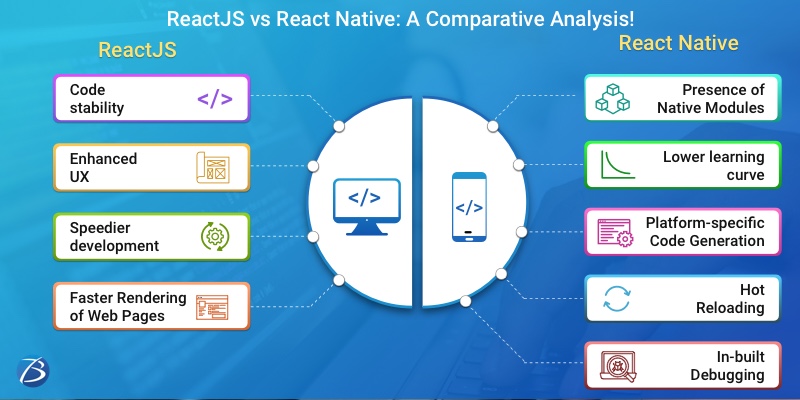
Code stability on account of One-way data flow

React.js employs one-way data binding for ensuring that the parent structures remain unaffected by any alteration made in the child structures. For this reason, every component becomes self-contained and when changes occur in smaller parts, updates need to be applied only in the data model and not the whole state. As a result, whenever a new edit is applied, a major part of the app remains unchanged. This makes the code pretty stable and so, ReactJS applications are easy to maintain.

Virtual DOM: Enhanced UX and Faster Development

The document object model commonly referred to as DOM is a logical structure containing documents in XML, XHTML, or HTML formats. Simply put, this is the process in which an agreement is visualized on the inputs and outputs of data which is present in the form of a tree. Layout engines are used by web browsers for transforming/parsing the representation HTML syntax into a document object model that can be viewed in the browsers.

The traditional DOM construct encounters issues due to the manner in which it processes the changes like queries, user inputs, etc. The server continuously checks the variation brought about by these changes for providing the required response. But, for providing proper responses, the DOM trees of the entire document need to be updated. And, since DOM trees are quite large these days, consisting of thousands of elements, the aforesaid process is not very simple.

Nevertheless, the React.js team managed to speed up updates with the usage of a virtual DOM, instead of using the real DOM like other frameworks. The virtual DOM is an abstract clone of the real DOM and updates even minor changes made by the user without affecting other portions of the interface. React’s data structure and its ability to isolate components quickly also contribute to this process.

This feature of React speeds up updates and facilitates the creation of a dynamic user interface and also eliminates the need for binding the DOM to the functionality at the front-end as it’s already connected to React elements. This functionality has increased the programming speed and has enhanced performance in React apps.

Speedier development owing to Reusable Components

React’s capacity to reuse components speeds up developments and reduces expenses. This is because owing to reusable codes the developers need not create different codes for app components that are similar. Furthermore, on account of React’s component-based structure, frequent debugging is not required, and if one part of the application is edited the other parts remain unaffected. This saves a considerable amount of time spent on debugging and testing.

Faster Rendering of Web Pages

ReactJS enables the speedier rendering of web pages resulting in lower page loading times, thereby lowering the bounce rate of web pages. Thus, web apps developed in React are SEO-friendly.

React Native: Unique Selling Points

The Presence of Native Modules

The presence of Native components quickens run times in React Native apps. Moreover, unlike other frameworks, React Native does not render code employing the WebView.

The Usage of JavaScript as the Scripting Language

With the use of JavaScript as the scripting language, the developers get to leverage the benefits of JavaScript’s powerful V8 engine and hence the process of creating the code for the browser becomes easy. Besides, owing to the simplicity of JavaScript, the developers encounter a lower learning curve as compared to other frameworks.

Platform-specific Code Generation

React Native’s capacity to generate platform-specific code is a distinct offering indeed. During React native app development, the framework automatically detects the platform on which it is running and generates the correct code for that particular platform.

Hot Reloading

The hot reloading feature in React Native enables the developers to reload a mobile application automatically. This way, the developers save a great deal of cycling time resulting in speedier development.

In-built Debugging

The latest version of React Native offers in-built support for Flipper - a popular debugging tool for developers. This tool provides several options like the ability to view crash reports from iOS/Android devices, visualizing and editing the preferences and database of the device, the facility of using these Dev Tools along with other tools, etc. Moreover, Flipper provides a marketplace that obtains plugins from NPM, and this allows the developers to install as well as publish custom plugins based on specific workflows.

ReactJS vs React Native: Roadblocks

Limitations of React.js

  • React lacks proper documentation and so, developers have to create documentation on their own leading to poor execution.
  • The environment is continually changing and this pace is so fast that the developers have to regularly learn new methods for executing functions.
  • Despite its support for numerous third-party libraries, the support for native libraries is limited. And, using additional external libraries involves loads of hassles and a steep learning curve.
  • React does not support simultaneous data handling and hence, the data navigation becomes quite intricate as well as challenging.
  • At times, additional libraries/components need to be downloaded thereby increasing the development time as well as expenses.

Limitations of React Native

  • Besides being a boon, the hot reloading functionality can become a limitation in certain scenarios. For instance, when the developers are working on the business logic or if there is a root change, the updates go live at once.
  • The context, in which programmers can locate the tags and CSS like HTML along with JavaScript, is held loosely resulting in a chaotic abstraction layer. So, developers face challenges when Swift/JavaScript rules are absent.
  • The fact that the React Native framework is still in its beta version, gives rise to debugging and compatibility issues.
  • React Native often encounters patenting and licensing issues that are not easy to resolve.

ReactJS vs React Native: Noteworthy Differences

  • React Native is a full-fledged framework for cross-platform app development and imparts a native-like look and feel to mobile apps. ReactJS is a JavaScript library for crafting dynamic, high performant, engaging web interfaces.
  • js is a base derivative of the React DOM, used for the web platform. React Native, on the other hand, works as a base derivative itself. So, the workflow and syntax are the same for both React and React Native, while the components are different.
  • React Native apps employ JSX – JavaScript – to render the UI whereas React.js apps employ HTML to render the UI.
  • The React Native framework uses APIs rendering components in mobile applications while React uses a virtual DOM for rendering the browser code.
  • Coming to styling, React Native developers make use of stylesheets whereas React.js developers use CSS for this purpose.
  • For creating animation across React Native app components, an animated API is employed. ReactJS makes use of CSS for producing animation and offers more animation creation options than React Native.
  • The security offered by React.js is much more than that of React Native.

Bottomline:

Although React and React Native are quite similar at the core, it has significant differences.  Both of these technologies have distinct abilities and are suited for particular software development projects.

If you need assistance with any of these technologies, reach out to Biz4Solutions. We are a leading React Native App Development Company as well as a proficient Reactjs App Development Company and have extensive experience in delivering high-end software solutions to clients across diverse industrial domains.

To know more about our other core technologies, refer to links below:

Ionic App Development Company

Angular App Development Company

.Net App Developments Company

Sunday, June 20, 2021

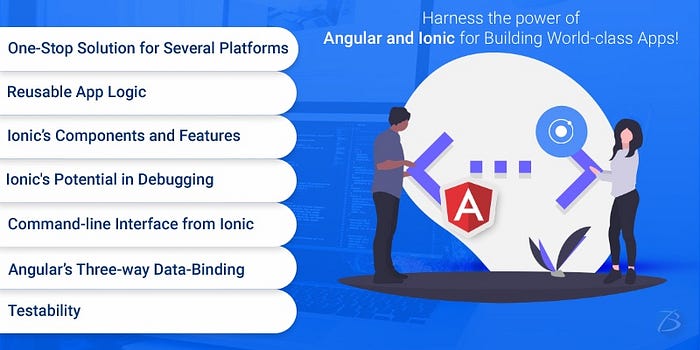
Harness the power of Angular and Ionic for Building World-class Apps!

Angular development has become one of the best approaches for designing highly intuitive applications and when clubbed with a finely-tuned Ionic framework, the combination becomes all the more powerful and leads to the creation of beautifully designed user-centric hybrid mobile apps. This combination has already being used for countless projects worldwide. Consequently, Ionic and Angular JS app development services are highly being preferred by diverse industrial domains for various applications.

So please read the following post to know more about these vibrant technologies and the benefits that their combination offers.

What is Angular:

Angular is an open-source framework maintained by Google. It is a client-side development framework and was developed by Misko Hevery, an engineer at Brat Tech LLC in 2009. The Angular framework was launched in 2012; the first version being AngularJS. This framework comes with a host of tools and libraries that enable the Angular app developers to easily create robust feature-rich apps for diverse client needs. Additionally, it helps in developing and testing the virtual platforms; and as a result, can be utilized for Enterprise apps. Some of the top features of this framework are:

  • Two-way data binding
  • Filters
  • Model View Controller (MVC)
  • Templates
  • Licensed under the Apache license version 2.0
  • Directives
  • Dependency Injection

What is Ionic:

Ionic is an open-source software development kit (SDK) that ensures faster and cost-effective app development of mobile apps, desktop apps, PWAs, etc. with the utilization of technologies like HTML5, CSS, SASS, etc. It was created on top of AngularJS in the year 2013 by Max Lynch, Adam Bradley, and Ben Sperry of Drifty Co. Thereafter, it has added the support for React and Angular; the support for Vue is still under development.

Ionic app development mainly focuses on the front-end. It is an innovative SDK that enables the development of top-grade personal and commercial apps. The development of Ionic apps is easier since the Ionic framework is simpler to learn and implement. Moreover, the Ionic App Developers enjoy working with this framework. The key features of Ionic’s are given below:

  • Platform Independence
  • Intuitive User Interface
  • Cordova Plugins
  • High Adaptability
  • CSS and JavaScript Components
  • Ionic CLI
  • Ionic View
  • MIT License

Combined Benefits of Both Technologies- Angular and Ionic

One-Stop Solution for Several Platforms:

Earlier, the developers needed to create separate codes for Android, Windows, iOS, etc. But AngularJS and Ionic changed this scenario allowing the development of multiple apps with a single codebase. Such apps can be easily downloaded from the app stores and can be run on any platform or device.

Reusable App Logic:

Fusing AngularJS and Ionic enables the developers to separate user interfaces, system logic, and data models. This means that the developers in parallel can reuse the logic and also customize the UI for different gadgets and different platforms like iOS, Android, Windows, etc. This reusability of the app logic has made the process less time-consuming and less expensive.

Ionic Components and features:

Creating innovative icons and splash screens is a challenging task, especially for hybrid app development. For developing splash screens, the developers have to consider several parameters like length, density, width, type of device, etc. Ionic is a native-style UI kit that comes with various amazing features and components for making the development process hassle-free. Ionic’s .png, .ai, or .psd extensions help in building two files that enable smooth development of icons, splash screens, etc., and aesthetically appealing designs.

Angular Three Way Data Binding:

Angular allows three-way data binding which means it enables simultaneous updating of the data model, UI as well as backend data in a hassle-free manner. So, when the in-memory data and UI are in sync with backend service data, the chances of user data staying complete across the devices are much higher. This also means that in Angular, it is easy to take the users’ inputs, process the information, save it on the server, and hence keeping the user interface synched with the backend is much easier.

Testability:

Testing is the most essential process once the apps are developed. It is a complicated and time-intensive process. But AngularJS eases out the testing process to a certain extent due to the Dependency Injection (DI) feature. This feature lets the developers fetch the pieces of the code from anywhere and duplicates the code for testing purposes. This means that the real components are replaced for the ones that fake the functionality.

Additional Benefit of Ionic app development:

Ionic plays a significant role in app development due to its potential in debugging, performance-boosting qualities, and the ability to create attractive UI. The Ionic developers can take advantage of $ionicConfigProvider elaborate transition, style, or behavioral pattern. It creates the elements as per the device’s layout and also abides by the guidelines while utilizing the elements on diverse devices. Also, Ionic apps are built in a modular fashion, hence it is easy to update and maintain the app.

Another noteworthy feature of the Ionic is the Command-line interface i.e. CLI. It enables the development, implementation, and testing of any application on multiple platforms using a single command. This improves productivity and saves time for developers.

Conclusion:

AngularJS framework is known for delivering robust performance and captivating front-end for the apps. On top of that, when it is clubbed with Ionic, it unlocks new possibilities for developing captivating apps. Ionic has attractive themes and the availability of several components that help in the creation of an outstanding UI. This ultimately elevates the user experience and also retains the end-users. Moreover, both frameworks make the development process quite easier and faster for developers and cost-effective for businesses. So, if you want to build apps using Ionic and AngularJS, connect with an Ionic app development company or an Angular app development company and share the ideas with them to build a cutting-edge app.

We hope this blog was useful to you!

Tuesday, December 29, 2020

Angular Vs React: Detailed Comparative Analysis!


Mobile app revenues were recorded to be 365 billion U.S. dollars in 2018 and they are expected to go beyond 935 billion U.S. dollars by the year 2023, as forecasted by Statista, a reputed portal for statistics. Looking at these figures, we can confidently say that the scope for app development has grown at an exponential rate. Millions of entrepreneurs across the globe are investing in mobile app development services like never before!

But the entrepreneurs and business professionals looking for creating a lucrative mobile app might face some hurdles. So, this article talks about one such hurdle and that is technology selection. Narrowing down the topic furthermore, the article discusses Angular and React- the two JavaScript-based technologies, widely used for creating SPAs. This read will provide you a detailed report on these technologies and help you make an informed decision on which one can be a better fit for your app development needs.

A Detailed Comparative Analysis between Angular and React

Technology Developed by:

Angular: Google

React: Facebook

Technology Type:

Angular: Written in JavaScript and is an MVC framework

React: A JavaScript library that has only view in MVC and needs Flux to employ architecture

Background and Reliability:

Angular:

Developed in 2016, Angular is maintained by Google’s team to date. It is a complete framework. Despite being a much younger technology in the market, it is widely used for diverse applications due to its reliability. In 2018, more than 600 apps were created in Google alone like Google Analytics, Google Cloud Platform, and many other apps for different business applications.

React:

React too belongs to a good family and is much older comparatively. It is being supported by Facebook. It was first used in 2012 by Facebook for its News Feed functionality and then made open-source in 2013. Today, React is extensively used in several applications and is considered a stable and reliable technology. React has more than 150,000 stars on GitHub.

Basic Concept:

Angular: Brings JavaScript into HTML, client-side rendering, works with real DOM

React: Brings HTML into JavaScript, server-side rendering, works with virtual DOM

Learning Curve:

Angular:

Learning Angular is quite challenging, especially for beginners, and requires rigorous training.

React

React is comparatively easier to learn and grasp, but when augmented with Redux, it can become difficult for learning.

Latest Version:

Angular: Angular 11, released on Nov 11, 2020

React: React 17.0.1, released on Oct 22, 2020

Installation Time:

Angular: Easy to set up, but at times, can require a longer time for coding which may lead to delayed project deliveries.

React: Though React takes longer to get installed, but once set up, it is considerably faster for delivering applications and other projects.

Features and Functionalities:

Angular:

Angular offers some of the outstanding features and functionalities such as:

  •          dependency injection
  •          class-based components that come with lifecycle hooks
  •          routing using @angular/router
  •          templates using HTML which is an extended version
  •          XSS protection
  •          code splitting options
  •          Ajax requests
  •          lazy loading
  •          component CSS encapsulation
  •          test runner, utilities, and framework for unit-testing
  •          @angular/forms for creating forms

Some of the features like forms, HTTP client, etc. are optional in Angular, but some features like dependency injection are built into the framework’s core and Angular developers need to use them compulsorily.

React:

·         It comes with JSX instead of classic templates; JSX is an XML-like language developed on top of JavaScript

  •          class-based components
  •          state management functionality
  •          code splitting
  •          lazy loading
  •          tools for unit-testing of components
  •          XSS protection
  •          error reporting and handling with error boundary

React doesn’t offer anything much for routing, dependency handling, advanced form calling, HTTP calls, etc. However, it leverages popular libraries like Fetch for HTTP requests, React-router for routing, React Testing or Enzyme Library for more unit-testing utilities, several techniques for CSS encapsulation, etc.

Significant Tools and Libraries:

Both, Angular and React, have a huge ecosystem of important tools and libraries associated with them to boost the performance of these frameworks.

Angular:

  •          Angular CLI
  •          Component Libraries like Material UI, PrimeNG, ng-bootstrap, NG-ZORRO, Onsen UI for Angular
  •          Angular Universal
  •          Ngx-admin
  •          State Management Libraries such as NGXS, Akita, and NgRx.
  •          Compodoc
  •          Ionic Framework
  •          Augury

Find a more detailed list of Angular tools in our blogs here.

React:                                                                                                             

  •          A CLI utility named Create React App
  •          Component Libraries such as ant-design, react-bootstrap, Material UI, Semantic UI, Blueprint, Onsen UI, etc.
  •          Styling Libraries like Emotion, CSS Modules, Styles components, etc.
  •          State Management Libraries such as MobX and Redux
  •          React Native
  •          PropTypes feature
  •          React Admin
  •          Next.js
  •          UI development environments like Storybook, MDX, React Styleguidist, etc.
  •          Gatsby
  •          React developer tools
  •          React 360
  •          Testing Helpers like Enzyme, built-in TestBed, Testing Library, etc.

Applications Developed:

Angular: Google Analytics, Forbes, Mesh, Firebase Console, Wepay, VMWare, Google Cloud Platform, Auto Trader, Upwork, Google Express, Beam, etc.

React: Uber Technologies, Facebook, Instagram, Pinterest, Netflix, etc.

Wrap-up:

Our article ends with this and we have seen the good and bad of both technologies. There is no winner here, both- Angular and React are apt for certain requirements and business applications. It depends on aspects like features required in the app, app size, budget constraints, skills and size of the team, the platform that you are targeting, when it needs to be out in the market, and several other factors. So, you can decide the best-suited option accordingly.

If you want some expert advice on whether to choose Angular or to go with React app development, contact Biz4Solutions, a renowned React and Angular app development company, based in Frisco, US. We have knowledge of emerging technologies like React, React Native, Angular, Flutter, Xamarin, PHP, .Net, Ionic, Swift, Objective-C, etc. Reach out to us at sales.enquiry@biz4solutions.com for more details.

To know more about our other core technologies, refer to links below:

Ionic App Development Company

Blockchain app developers


Wednesday, December 23, 2020

Significant Differences between Creating Android and iOS Apps with React Native!


 The number of iOS and Android apps being developed and downloaded is exponentially rising every year and there is no sign of its slowdown. So, countless businesses have started developing outstanding apps to serve users and gain enormous profits. If you too want to build an iOS and an Android app for your project and bring them to the market faster while being cost-efficient, React Native App development is the best approach. It offers multiple benefits like the below:

  • Cross-platform functionality
  • Speedier development
  • Time efficiency due to code reusability
  •  Faster time-to-market
  •  Performance similar to Native apps

However, there are some noteworthy differences in the development, features, testing, release process, etc. of both platforms. In this article, we have outlined those differences which will be quite helpful to the React Native developers. So, let’s analyze them.

Differences between Android and iOS that are observed while developing the React Native apps:

Tools Required for Development and Testing

Android:

For creating Android applications using React Native, the toolset that is required includes- Android Studio, Java Development Kit (JDK), Android SDK, and related configuration. Also, Android applications can only be tested using this official tool- Android Studio. Though there are some more tools available, they aren’t official and are limited in numbers.

iOS:

For creating iOS apps using React Native, Xcode is required. Xcode installs the essential tools and the iOS simulator and thus helps in iOS app development. Additionally, MacOS is also required to work with Xcode.

When it comes to testing the iOS apps, you won’t find any official operating tool. Some other tools are available, however, since they aren’t developed or approved by Apple, they aren’t considered much reliable.

Native Components or Elements

React Native developers will experience that several components or elements will appear differently on iOS and Android for the same app. This is so because the React Native framework translates the components into the respective native component for any specific platform. As a result, these cross-platform differences will always persist. To consider an example, there is a date picker component. This component appears differently in an iOS simulator and an Android emulator.

Platform-specific Style Elements

The React Native framework supports styling depending on the particular platform, so the styles that are employed in Android and iOS apps look different in both. For instance, let us consider the shadows feature. This feature will be visible in iOS apps but in Android, it won’t be visible, as Android doesn’t support this shadow element in React Native. Here, the developers will need to use the elevation property.

Linking Third-party Libraries

If you want to integrate React Native third-party libraries in your Android or iOS app, there are some differences between both these platforms that need to be considered. Though auto-linking can be used for adding native dependencies to most of the projects, but at times, manual intervention is required for linking these libraries. For doing this, the React Native developers need to have good knowledge of coding with Java and Objective-C. Usually, these libraries have strong documentation, but in some cases, there is no proper documentation available, causing issues while app development.

Differences in OS Designs

React Native may be used for faster and easier development of cross-platform applications, but, it does not allow complete code reuse in Android and iOS apps. Variations in the design structure of Android and iOS systems are somewhat responsible for this. For instance, iOS apps are very minimalistic, on the other hand, Android apps have extravagant design patterns. So, the React Native developersmust be aware of this and they should ensure that the apps are well-designed to suit the respective operating systems they are developed in.

Release Process

Android: The Android apps have to be released on Google Play and the release process for Android apps is pretty straightforward and easier.

iOS: If compared with Android, the release process for iOS apps is quite stringent. Security is of the utmost importance when it comes to iOS. Hence, App store guidelines are stricter and their review process is critical. So, before releasing the app, test the apps thoroughly to meet all the guidelines for the App Store, and get it approved.

Wrap-up:

We have seen the major variations in the Android app development and iOS app development process using React Native. Most of these differences are related to app appearance, tooling, styling, etc. Knowledge of these variations is a plus for a React Native developer.  So the inference we can draw from the above information is that only about 10 to 15% of the code needs to be written separately for both the platforms, the rest of the features can be handled using a single codebase.

If you are looking for the creation of top-grade React Native apps in Android and iOS, get in touch with Biz4Solutions. We are a promising React Native app development company and have a track record of developing modern-day applications for diverse business domains. We have 9+ years of experience in serving global clients and helping them achieve their goals through our React Native development services. Reach out to us at sales.enquiry@biz4solutions.com

To know more about our other core technologies, refer to links below:

Angular App Development Company

Ionic App Development Company